How to Charge a Portable Power Station Without Grid Access?

Time:2026-10-23 Author:Amelia
0%

When the grid disappears, a portable power station becomes more than a convenient battery. It becomes a small energy system that needs planning, measured inputs, and realistic expectations. The practical question is simple: How to charge a power station without grid access?

Will Prowse, an independent solar educator and battery reviewer, often stresses a useful rule: “Test, don’t guess.” That principle matters outdoors. A folding solar panel may show 200 watts on its label, yet produce far less under clouds, dust, shade, or a low sun angle. A vehicle charger can help during travel, but it may charge slowly and increase fuel use. A compatible generator offers dependable backup, although noise, ventilation, and fuel storage require attention.

This guide examines each option through real-world details. We will consider solar charging, car charging, portable generators, and combined methods. You will see how to match panel voltage, connector type, battery capacity, and maximum input limits. Never force an unfamiliar cable into a charging port. Never exceed the manufacturer’s specifications.

A phone, lamp, and small cooler may run for days. A heater or kettle can drain the battery quickly. That difference is easy to underestimate. I have also seen charging plans fail because users relied on perfect sunlight. Weather changes. Batteries age. Every setup needs a fallback.

The best off-grid method is not always the fastest one. It is the method you can monitor, maintain, and repeat safely.
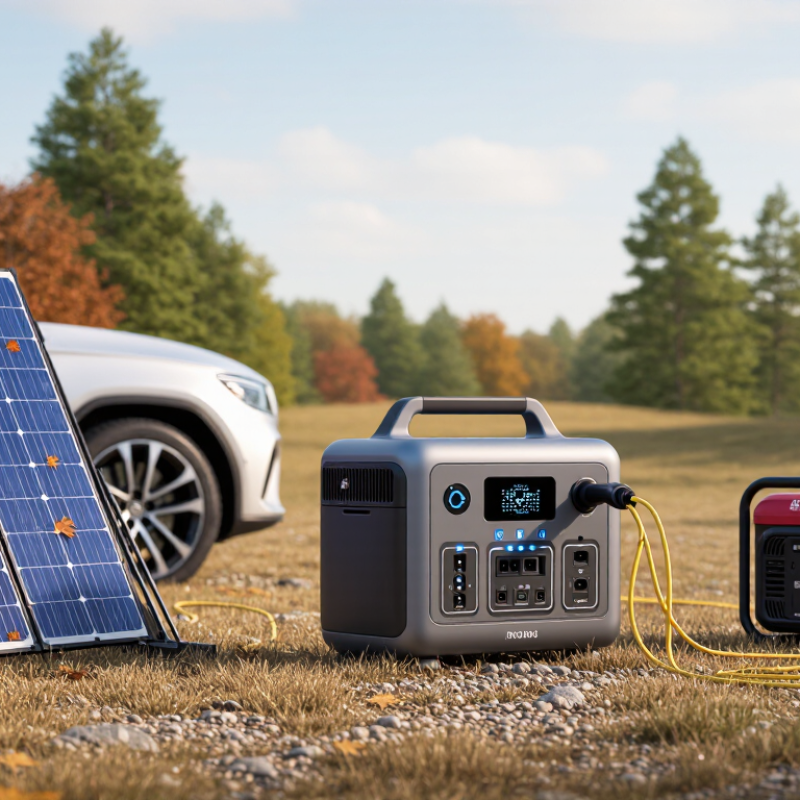
How to Charge a Portable Power Station Without Grid Access?

Identify the Portable Power Station’s Charging Requirements

Before charging off-grid, identify the portable power station’s exact charging requirements. Check battery capacity, input voltage, maximum input wattage, and connector type. The label must distinguish usable watt-hours from nominal capacity. A 1,000Wh battery may deliver less after conversion losses. Check the manual, not only the product display.

Solar charging requires compatible voltage and current ranges. Confirm the panel’s open-circuit voltage stays below the station’s maximum input voltage. Confirm its operating voltage reaches the MPPT controller’s minimum range. A 200W panel will not always provide 200W. NREL’s PVWatts documentation uses a default 14% system-loss assumption, before weather and shading effects. With five peak-sun hours, that panel might produce roughly 860Wh daily under favorable conditions. That estimate is imperfect. Dust, clouds, and heat can reduce it sharply.

Charging speed also depends on battery chemistry and temperature limits. Lithium iron phosphate batteries often accept stable cycling, but the station may restrict charging below freezing. The International Energy Agency reported more than 1TWh of battery demand in the energy sector during 2023, showing how rapidly storage is scaling (IEA, Batteries and Secure Energy Transitions, 2024). Scale matters. A larger battery still needs enough solar input. For a 1,000Wh unit, calculate required energy, divide by realistic solar output, then add reserve. I would keep at least 20% capacity unused during uncertain weather. That reduces stress, though it does not guarantee overnight power.

Choose a Suitable Off-Grid Power Source

When the grid disappears, solar power is usually the most practical starting point. It is quiet, modular, and available in many remote locations. IRENA’s Renewable Capacity Statistics 2024 reported about 346 gigawatts of new solar capacity worldwide in 2023. That growth reflects improving costs and broad field experience.

Match the source to your conditions. A foldable solar array suits sunny camps and emergency kits. Check its rated output, voltage range, and connector compatibility before buying. Shade matters. A panel under tree branches may produce far less power than its label suggests. The National Renewable Energy Laboratory notes that real photovoltaic output depends on weather, orientation, temperature, and system losses. Leave room for disappointment.

I once sized a solar setup from perfect midday figures. It struggled during cloudy afternoons. A safer design adds 30–50% extra panel capacity and keeps essential loads small. Vehicle charging can help during long storms, but it consumes fuel and requires a compatible charging input. A certified fuel generator provides steadier output, yet it must operate outdoors, away from doors and windows. Never improvise ventilation. Micro-wind systems can work on exposed ridges, but urban turbulence often makes them disappointing. Track daily watt-hours, not only battery capacity. The International Energy Agency reported that solar became the leading source of global renewable capacity expansion in 2023, but local weather still decides your actual recharge speed.

Connect and Position the Charging Equipment Safely

How to Charge a Portable Power Station Without Grid Access?
Connect and Position the Charging Equipment Safely

Before charging, inspect every cable for cuts, crushed insulation, or loose plugs. A damaged cable can heat quickly. Confirm the connector type, polarity, voltage, and permitted charging current in the power station’s manual. Do not force a connection.

I once treated a tight plug as a secure plug, but it was actually misaligned. That small mistake changed how carefully I check connections.

Place the power station on a dry, level surface with clear space around its vents. Keep it away from standing water, direct heat, and flammable materials. For solar charging, angle the panels toward the strongest available sunlight, then secure them against wind. Avoid placing panels where branches create moving shadows.

Connect the panels before switching on charging, if the manual requires that sequence. Keep cables off wet ground and protect them from sharp edges.

For vehicle charging, use a suitable socket and keep the cable away from pedals, hinges, and hot engine parts. If using a fuel-powered generator, operate it outdoors, far from doors and windows. Never use one inside a room, garage, or enclosed shelter.

Check the connectors again after ten minutes. Warm equipment may be normal, but burning smells, swelling, buzzing, or excessive heat require immediate disconnection.

I still recheck the setup after changing the panel angle. Small changes can expose weak cable placement.

Monitor Charging Progress and Manage Power Input

Charging a portable power station without grid access requires more than connecting a cable. I check the input source, connector, and voltage before charging. A compatible solar panel, vehicle outlet, or generator can work, but each source has different limits. The station’s display should show input watts, battery percentage, and estimated charging time. I watch these readings every few minutes, especially during the first connection.

Clouds can reduce solar input from 180 watts to 40 watts within seconds. Keep the panel clear of shade, dust, and standing water. Adjust its angle as the sun moves. If the input suddenly drops, I inspect the cable before blaming the weather. Sometimes the cable is loose. A small mistake.

Power management matters while charging. I turn off unnecessary output ports and avoid running heaters or cooking devices during slow solar charging. If several devices are connected, I prioritize communication equipment, lights, and medical necessities. The input display helps reveal whether the battery is gaining power or merely holding steady. A cooling fan may also start in warm conditions, using some incoming energy. I used to trust the time estimate too much. It changed often, so I now treat it as guidance, not a promise. Stop charging if the unit becomes unusually hot, smells strange, or shows an error, then follow the operating instructions.

How to Charge a Portable Power Station Without Grid Access? - Monitor Charging Progress and Manage Power Input
Charging Method Typical Input Specification Example Input Power Estimated Time for a 500 Wh Battery How to Monitor Progress Power-Input Management Important Safety Considerations
Portable Solar Panels 18–24 V DC output; commonly 100–400 W for a portable setup 200 W in strong, direct sunlight About 3.0 hours of effective sunlight, assuming approximately 85% charging efficiency Input watts Battery percentage Estimated time remaining Place panels in direct sunlight, adjust their angle during the day, keep connectors dry, and disconnect unused panels when conditions become unstable. Actual output falls because of clouds, shade, heat, panel angle, cable losses, and the station’s maximum solar-input limit.
Vehicle 12 V DC Socket Usually limited by the vehicle socket and station input; a practical example is 10 A at 12 V Approximately 120 W About 4.9 hours while the vehicle is running, assuming approximately 85% charging efficiency DC input watts Voltage Charging status Use the vehicle’s accessory rating, avoid overloading the socket, and stop charging if the cable or plug becomes hot. Do not rely on the socket with the engine off for extended periods because it can discharge the starter battery.
Vehicle 24 V System 24 V DC system; current depends on the socket, cable, and charging adapter Approximately 240 W at 24 V and 10 A About 2.5 hours at the example power level and approximately 85% efficiency Input voltage Input watts Temperature Confirm that the charging input accepts the adapter’s voltage and polarity before connecting it. A 24 V source must not be connected to an input designed only for 12 V. Use a correctly rated adapter or DC-DC charger.
Fuel Generator AC Outlet Common portable generator output: 120 V or 230 V AC; charging power is set by the station’s AC charger 500 W charging limit in this example About 1.2 hours at 500 W and approximately 85% efficiency AC input watts Battery percentage Charge temperature Use an eco or low-output mode when available, keep the generator load below its continuous rating, and turn it off when charging is complete. Operate outdoors only, away from doors and windows. Carbon monoxide can accumulate indoors or in partially enclosed spaces.
USB-C Power Delivery Source Up to 100 W is common for high-power USB-C sources; the station must support USB-C charging 100 W About 5.9 hours for 500 Wh at approximately 85% charging efficiency USB-C input watts Negotiated voltage Battery percentage Use a cable rated for the required current and power, and avoid combining inputs unless the station explicitly supports simultaneous charging. Charging may be slower if the source shares power with other devices or reduces output because of heat.
Solar Panel Plus Vehicle Charging Two independent DC sources; simultaneous input is permitted only when the station supports it Example: 200 W solar plus 120 W vehicle input = 320 W combined About 1.8 hours at the combined example power and approximately 85% efficiency Each input wattage Combined wattage Temperature Check the station’s combined-input limit and monitor both sources. Reduce input if the battery or connectors become hot. Do not parallel incompatible voltage sources or connect two outputs together without approved input isolation.
Manual Charging Control Not a charging source; a management method used with solar, vehicle, generator, or USB-C input Adjust the source to remain below the station’s rated input limit Varies with the selected source and available power Live wattage Battery percentage Temperature Error alerts Pause charging during overheating, unstable generator output, severe weather, or repeated input faults. Resume only after the cause is corrected. Follow the station’s rated voltage, current, connector, and temperature limits. Never bypass built-in protection circuits.
Time estimate formula: Charging time ≈ Battery capacity in Wh ÷ Charging input in W ÷ Charging efficiency. Example: 500 Wh ÷ 200 W ÷ 0.85 ≈ 2.9 hours of effective charging time.
Monitoring checklist: Confirm the input source, check live input watts, observe battery percentage and estimated time remaining, watch charging temperature, inspect cables and connectors, and verify that actual input stays within the portable power station’s rated limits. Solar charging time refers to effective sunlight rather than total daylight hours.

Store and Maintain the Equipment for Future Use

How to Charge a Portable Power Station Without Grid Access?

After charging with solar panels or a vehicle, let the power station cool before storage. Heat shortens battery life. Wipe dust from the vents, ports, and display with a dry, soft cloth. Keep the unit indoors, away from moisture, direct sunlight, and flammable materials. A stable shelf is safer than a garage floor. Follow the equipment manual, because battery chemistry and storage limits can differ.

For long-term storage, leave the battery at the level recommended by the manufacturer. Around 40% to 60% is common for many lithium-based units, but the manual remains the authority. Check the charge every two or three months. Recharge it if the level becomes unusually low. Do not wait until the screen shows zero. Inspect the cable insulation and charging port before every maintenance cycle. Stop using the unit if you notice swelling, leakage, cracking, or a sharp chemical smell.

My own storage routine was not perfect. I once stored a unit beside a cold window and forgot its inspection date. The battery still worked, but its charge dropped faster than expected. A simple calendar reminder would have helped. Keep a short record of charging dates, storage levels, and any unusual sounds. Test a small lamp occasionally, rather than running the station completely empty. This reveals problems early while preserving useful reserve power.

Estimated Charging Time Without Grid Access

Estimated hours required to fully charge a 1,000 Wh portable power station using common off-grid sources. Solar estimates assume 70% real-world system efficiency, while vehicle and generator estimates include typical conversion losses. Actual results vary with sunlight, temperature, battery condition, and equipment limits.

FAQS

How can I charge a portable power station without grid access?

Use a compatible solar panel, vehicle outlet, or generator. Check the voltage, connector, and input limits before connecting. Compatibility matters.

What should I monitor during charging?

Watch the input watts, battery percentage, and estimated charging time. Check the display every few minutes after connection. Readings can change quickly.

Why does solar charging sometimes become weak?

Clouds can reduce input from 180 watts to 40 watts within seconds. Shade, dust, standing water, or a poor panel angle can also reduce power. Adjust the panel as the sun moves.

What should I check when the input suddenly drops?

Inspect the cable, connector, and panel surface before blaming the weather. A loose cable may cause the problem. A small mistake.

Can I use devices while the station charges?

Turn off unnecessary output ports during slow charging. Avoid heaters and cooking devices when solar input is limited. Prioritize communication equipment, lights, and medical necessities.

Why does the estimated charging time keep changing?

Solar conditions, connected devices, and cooling fans affect the estimate. Treat the displayed time as guidance, not a promise. I trusted it too much once.

When should I stop charging immediately?

Stop if the unit becomes unusually hot, smells strange, or shows an error. Follow the operating instructions before using it again. Do not ignore warning signs.

How should I store the power station after charging?

Let it cool before storage. Wipe vents, ports, and the display with a dry, soft cloth. Keep it indoors, away from moisture, sunlight, and flammable materials.

What charge level is suitable for long-term storage?

Follow the equipment manual because storage limits can differ. Around 40% to 60% is common for many lithium-based units. Check the level every two or three months.

How can I notice storage problems early?

Inspect the cable insulation and charging port during maintenance. Stop using the unit if it swells, leaks, cracks, or smells sharply chemical. Test a small lamp occasionally, not the entire battery. A calendar reminder helps.

Conclusion

When learning how to charge a power station without grid access, begin by checking its input requirements, supported charging methods, voltage limits, and estimated charging time. This information helps you select a suitable off-grid energy source, such as compatible solar panels, a vehicle outlet, or another safe electricity source. Choose equipment that matches the power station’s specifications and place it on a stable, dry, and well-ventilated surface. Keep cables organized, protect connections from moisture, and avoid using damaged cords or unsuitable adapters.

During charging, monitor the input power, battery level, temperature, and warning indicators. Adjust the energy source when conditions change, especially if sunlight or vehicle power fluctuates. Disconnect the system once charging is complete or if unusual heat, odors, or error signals appear. After use, store the power station and accessories in a cool, dry location, keep the battery at an appropriate level for long-term storage, and inspect the equipment regularly. Proper handling improves safety, reliability, and readiness for future off-grid use.

Amelia

Amelia

Amelia is a seasoned marketing professional with a wealth of expertise in our company’s core offerings. With an unwavering passion for driving growth and innovation, she plays a pivotal role in shaping our marketing strategies and enhancing brand visibility. A key aspect of her responsibilities......